
August 26, 2025: Introducing Pins to the Mapping Canvas
Release Notes · Updated August 26, 2025
General Release
We are excited to announce a major update to the Mappings Canvas in Reactor, designed to help you navigate and manage your complex data pipelines with greater ease and efficiency. We know that as your data transformation needs grow, your pipelines can become complex, making it difficult to find the specific configurations you need to edit.
With this update, we are introducing the new Pins feature, which allows you to customize your Mappings Canvas view and focus on the objects that matter most to you.
The Problem: A cluttered canvas
For organizations with many data transformation pipelines running through Reactor, the Mapping Canvas can become difficult to navigate when all sources, models, and outputs are displayed on the page. With 20 or more of each object, scanning the canvas to find what you need can be a challenge.
The Solution: Pin your objects
Instead of displaying all objects by default, the new Mappings Canvas starts clean, allowing you to build your own customized pipeline view. You can now search for a source or a model configuration you want to edit or pin one or more objects to the canvas.
How Pins Work
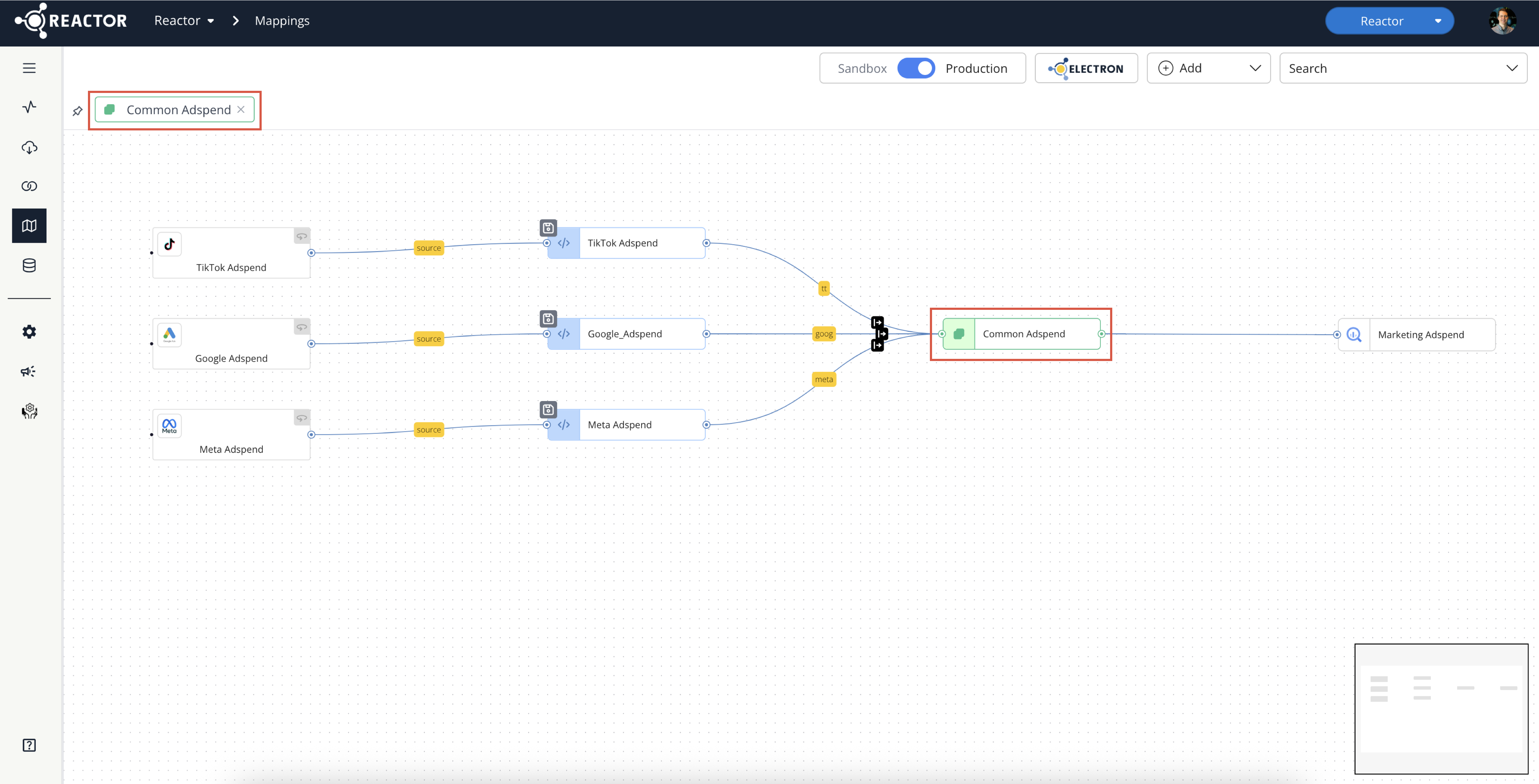
When you pin an object, all related objects directly connected to it are also pinned to the canvas, giving you a focused, relevant view of that specific pipeline segment.
- Pin a Model: This will also display any sources and outputs connected to that model, as well as any other models connected to it.
- Pin a Source: This will display all downstream models and outputs connected to that source.
Key Features of Pins
- Customized Views: Pin as many or as few objects as you want to create a canvas view tailored to your current task.
- Persistent Pins: All objects you have pinned will be displayed as tiles in a ribbon above the canvas and will persist across sessions, so your view is ready for you the next time you log in.
- Easy Management: You can easily unpin any object by selecting the ❌ icon in its tile on the ribbon.
This update is part of our ongoing commitment to making Reactor the fastest, most efficient ETL path to useful data models. We believe this new Mappings Canvas experience will significantly improve your workflow and help you get the exact data shape you need, faster.