
Using the Semantic Layer in Mappings
Mappings · Updated July 2, 2025
Introduction
This document explains how to use the semantic layer within Reactor's mapping process. Semantic models are a powerful tool for organizing and transforming data, making it easier to understand, use, and manage. This guide will help you understand what semantic models are and how they are used in Reactor.
Prerequisites
Before you begin mapping data, ensure that you have completed the following:
- Connect Data Sources: Connect all the data sources you'll need for your mapping. (For details, see the Connect to a Data Source documentation.)
- Standardize Source Data: Standardize the data from your connected sources to ensure consistency. (For details, see the Standardize Your Source Data documentation.)
- (Optional) Configure Source Links: If you need to combine data from multiple sources, set up Source Links. (For details, see the Source Links documentation.)
- Review Mapping Documentation: Familiarize yourself with the general mapping process by reviewing the Mapping Data in the Mapping Canvas and Writing Mapping Expressions in Reactor documentation.
What is a Semantic Model?
A semantic model is a way of representing data that focuses on its meaning and how different pieces of data relate to each other. Think of it as a blueprint that defines what your data means, not just how it's stored.
Semantic models make it easier to:
- Understand Data: By giving data elements clear definitions, semantic models help everyone understand what the data represents.
- Communicate About Data: They provide a common language for discussing data across different teams and systems.
- Use Data Consistently: Semantic models ensure that data is interpreted and used in the same way throughout your organization.
In Reactor, semantic models are used to transform data as it moves between different systems or formats.
Benefits of Using Semantic Models in Reactor
Using semantic models in Reactor offers several advantages:
- Source-Agnostic Entities: Semantic models allow you to map data from different sources into common entities. For example, an "order" from Amazon and an "order" from Shopify can be represented with the same set of attributes in a semantic model, even though the original data might look very different.
-
Centralized Transformations: Semantic models are defined early in the data pipeline. This means that most of the data transformation happens in one place, making it easier to:
- Troubleshoot data issues.
- Understand how data is being transformed.
- Reduce the learning curve for new users.
- Reusability: A single semantic model can be used to provide data to multiple destinations. For example, an "order" model can be used to populate both a customer order table and a sales reporting table.
The Common Data Pipeline in Reactor
In Reactor, a typical data mapping pipeline looks like this (from left to right in the mapping graph):
- Data Source
- Source Mapping Configuration
- Model Mapping Configuration
- Output
-
Source Mapping Configuration: In this step, you map fields from your data source to the fields in a semantic model.
-
Model Mapping Configuration: In this step, data from the source mapping is passed along, and you can create additional, source-agnostic fields based on the mapped data. You can also combine data from multiple sources into a single semantic model. If you've linked data sources, you can also map the linked data in this step. (See the Source Links documentation for more information on linking sources.)
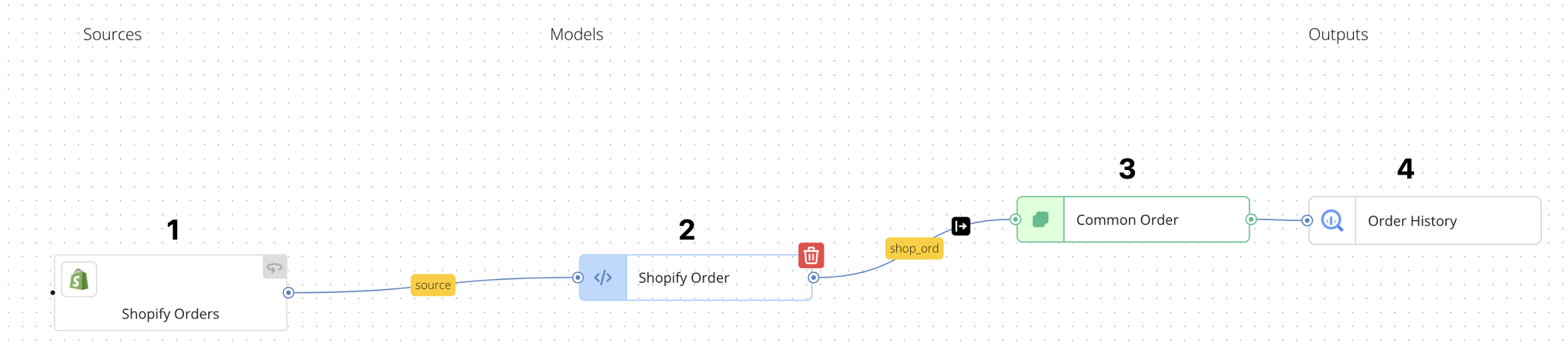
Example: Shopify Order Data
Let's look at an example of how this works with Shopify order data:
-
Data is collected from the Shopify Orders source.
-
The collected data is transformed in the Shopify Order source mapping configuration.
-
The transformed data is further enhanced in the Common Order model mapping configuration, which configuration serves two purposes:
- It propagates the fields from the Shopify Order source mapping configuration (See How to Propagate Inputs for more information about propagating fields from an upstream model).
- It creates 8 additional, derived fields. (See How to Create Source-Agnostic Derived Attributes in a Semantic Model below for more information.)
-
The transformed data is output to the Order History destination target.
Semantic Layer Best Practices
Transform As Far Upstream As Possible
A general rule of thumb is to transform your data as early as possible in the pipeline. For example, in the Shopify example above, the Shopify field order_number is renamed to order_id in the Shopify Order source mapping configuration.
The benefits of this approach include:
- Consistent Data Definitions: Everyone uses the same names and definitions for data fields.
- Easier Troubleshooting: It's easier to find and fix data issues when transformations are centralized.
- Reduced Data Mismatches: It minimizes differences in how data is represented across different sources.
ℹ️ The main exception to this rule is explained in the next section.
How to Create Source-Agnostic Derived Attributes in a Semantic Model
You'll often need to create new fields in your data model calculated from existing fields. These are called "derived attributes."
Semantic models are the ideal place to create derived attributes that are common across multiple sources. By transforming source-specific fields into a common semantic model, you can write a single expression to calculate the derived attribute, avoiding redundant calculations for each source.
Example: gross_sales
Imagine you want to calculate the gross_sales for an order. This is calculated by multiplying the price of each item by its quantity and then adding up the results for all items in the order.
If you're getting order data from both Shopify and an order line file, they might use different names for the price and quantity fields.
-
Shopify:
line_items.price(map toline_items.price),line_items.quantity(map toline_items.quantity) -
Order Line File:
ItemPrice(map toline_items.price),Quantity(map toline_items.quantity)
By first mapping the source fields to a common field names (i.e., line_items.price and line_items.quantity), you can create the gross_sales field with a single expression in the model mapping configuration.
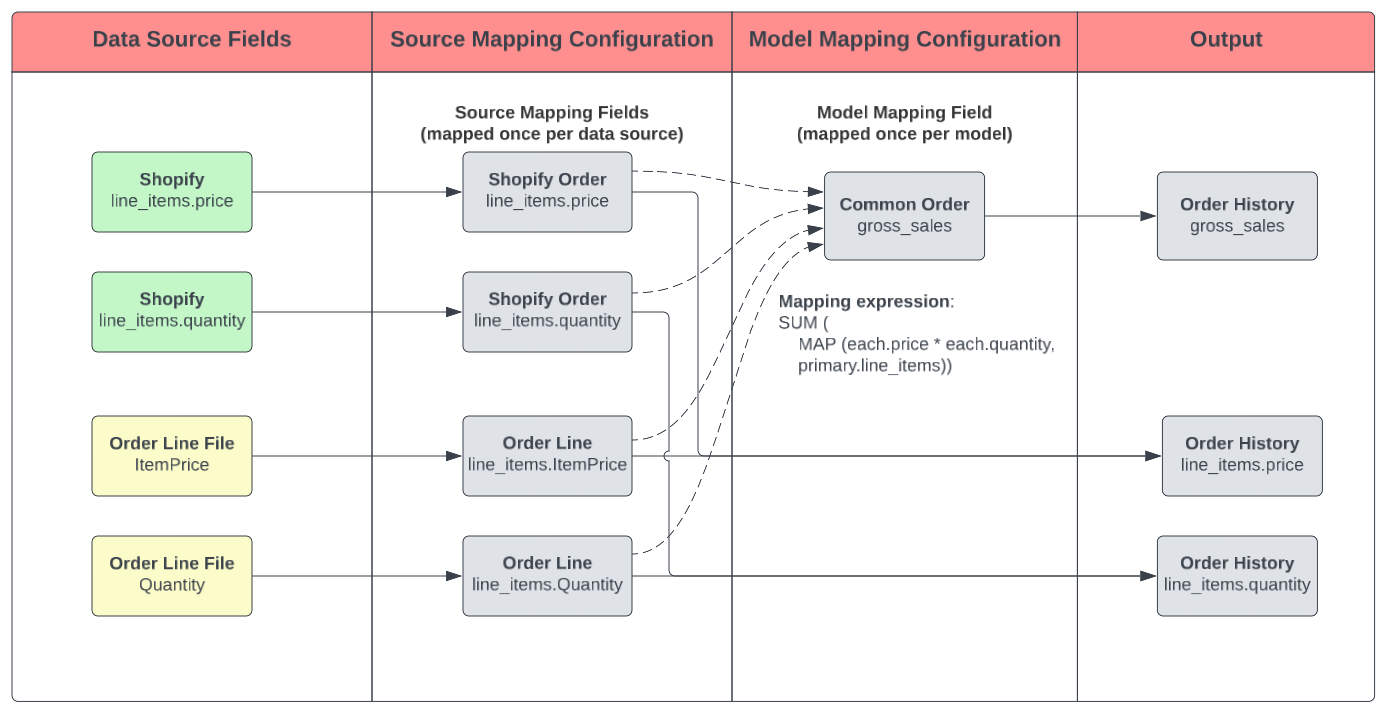
Benefits of This Approach
- Efficiency: You write the calculation only once, instead of multiple times for each source.
-
Scalability: If you add a new order data source (e.g., from a third-party marketplace system), you only need to map its data to the
line_items.priceandline_items.quantity; thegross_salescalculation is already in place downstream once you connect your new source mapping configuration to the Common Order model. - Consistency: It ensures the derived attribute is calculated consistently across all data sources.
Other Typical Data Mapping Pipelines
Multiple Data Sources That Output to the Same Destination
It's common to map data from multiple sources into a single semantic model, which then outputs to a single destination. This is useful when you want to combine data from different systems representing the same information type.
For example, per the above diagram, you might want to combine order data from Amazon and Shopify into a single "Order History" table. Both sources can be mapped to a Common Order model, which leads to the Order History Output.
Similarly, you can combine marketing campaign adspend data from various platforms (Google Ads, Meta Ads, etc.) into a common adspend model.
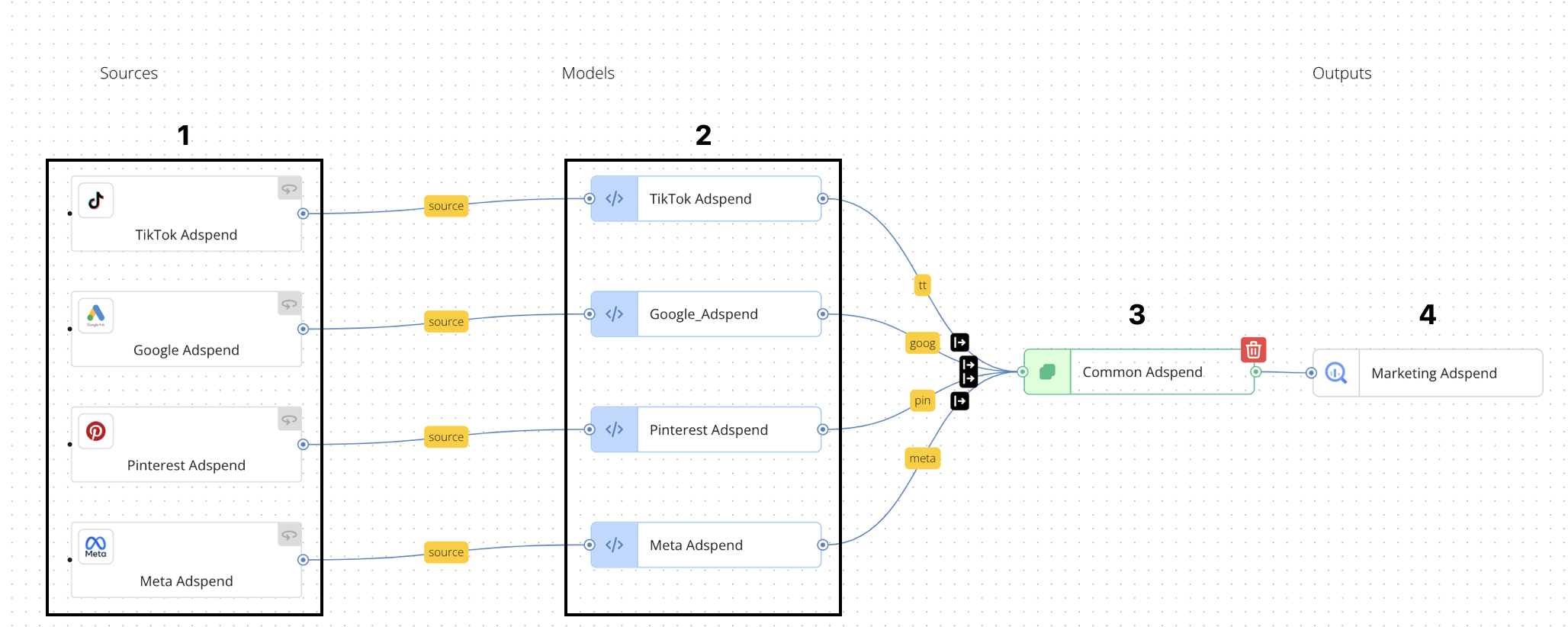
In this case:
- Adspend data is collected from each source
- The collected data is transformed into a source-specific "Adspend" entity in a source mapping configuration
- Then, the data from all sources is combined in the Common Adspend model configuration. This is similar to a SQL
UNIONoperation, in that data from multiple inputs . - Finally, the combined data is exported to the Marketing Adspend destination target.
Mapping Linked Data Sources to a Single Output
ℹ️ Before mapping linked data sources, please review the Source Links documentation.
In this scenario, similar to a SQL JOIN operation, you can map data from two linked sources to a single output. For example, if you have order header data and order line data coming from separate files or API endpoints, you can link these sources and then map the combined data to a single output.
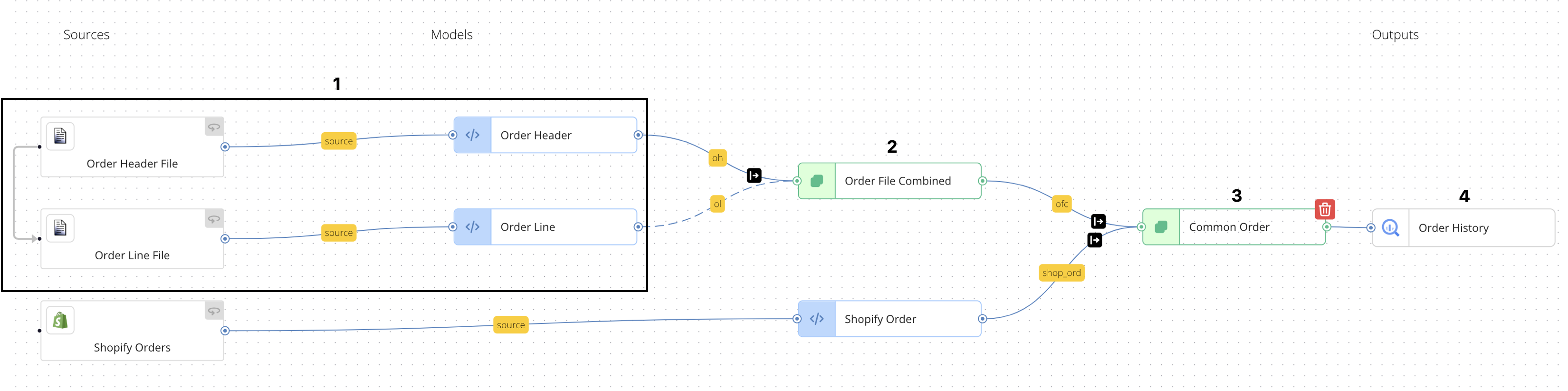
In this case:
- Each source is mapped to its own source mapping configuration (Order Header and Order Line).
- The linked data from the two sources is joined in the model mapping configuration Order File Combined, which contains inputs from both upstream source mapping models.
- The linked data from the Order File Combined model outputs to the Common Order model used above for Shopify orders, as the orders in the Order Header and Order Line files differ from the Shopify orders.
- The result is a complete order entity that combines data from both sources and outputs to the Order History destination target.
Unnesting A Nested Array
When dealing with highly nested data, it may be necessary to take data from nested within array and output a portion of the nested array. In the scenario below, inventory data from VTEX, an online marketplace platform, is deeply nested within two separate arrays in the source data:
- The
sellersOffersarray lists inventory from each marketplace selling partner who sells a particular product (SKU) on a portfolio of websites. - The
salesChannelOfferarray lists the inventory offered by a single selling partner on each website that sources products from the selling partner

In this case:
- Raw data is collected from the source system, VTEX: Matched Offers.
- The raw data is modeled into a twice-nested array called
seller_offers.channel_offersin the vtex matched offers source mapping model, wherein the nested array contains all the fields contained in the schema of the destination output target connected in this pipeline. - In the Common_Inventory model mapping configuration, all
channel_offerssub-arrays are combined into a single array calledinventory. - In the Inventory (New) output configuration, an iterator expression on the
inventoryarray ensures each object in theinventoryarray is output as a distinct database row. See our help article How to Configure an Output Iterator for more information on iterators.
Converting an Object to An Array
Conversely, it is sometimes necessary to take an input object and convert it to an array, so that multiple inputs have the same data type. In the next scenario, two sources of product data (Shopify, and a PIM file export) are formatted slightly different:
- The Shopify data groups product variations in a single array per product family.
- The PIM data does not group product variations; each product variation takes up its own row in the file.

In this case:
-
Shopify Products data is mapped in the Shopify Product source mapping model, which outputs an array called
productthat contains one object per product variation in a product family. - Source-mapped Data from the linked sources Product Item Master and Product Cost File are combined into a single output in the PIM_Product model mapping configuration.
- Because the model mapping configuration outputs a single object, while the Shopify Product output is an array, the PIM_Product output is wrapped in an array called
productin the PIM Product Array model mapping configuration. - Then, the data from Shopify Product and PIM Product Array is unioned in the Common Product model configuration.
- In the Product Data output configuration, an iterator expression on the
productarray ensures each object in theproductarray is output as a distinct database row.
Branching One Model into Multiple Models
When mapping nested data to unnested output tables in a relational database, data from one model can be broken out to separate models connected to a corresponding output. In the next scenario, Amazon.com order data is output to a database table containing Amazon orders and a second database table containing Amazon order lines.
ℹ️ This is a common use case when migrating from Fivetran to Reactor, as Fivetran typically outputs nested data into multiple unnested output tables in the data warehouse.
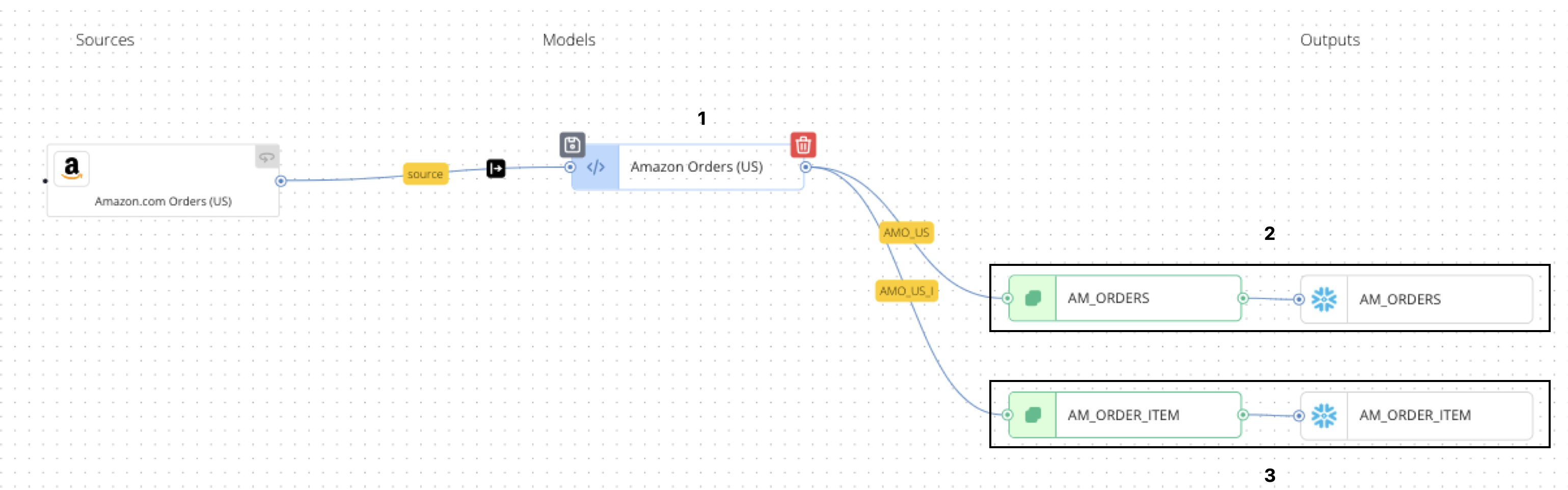
In this case:
- Data from the source is cleansed and augmented in the Amazon Orders (US) source mapping configuration.
- In the AM_ORDERS model mapping configuration, order header-level details are mapped from the Amazon Orders (US) input and output to the AM_ORDERS destination target.
- In the AM_ORDER_ITEMS model mapping configuration, order line-level details are mapped from the Amazon Orders (US) input and output to the AM_ORDER_ITEM destination target. The model nests order lines as distinct objects in an array called
order_item, while the output contains an iterator expression on that array to ensure that each order line in the order is output as a distinct database row.